New pilot guide · UK
Got a new drone? Start here.
Three things before your first flight: set the drone up at home, check which drone IDs you need, and keep your first flights to calm days, well inside your drone's wind limits.
Free, with no account needed. Learner mode is built in.
Step 1 · At home
Before you go outside
Do the setting up at home, where you have Wi-Fi, a charger and somewhere warm. Doing it in a field uses up battery and daylight you would rather spend flying.
Charge everything
Every flight battery, the controller, and your phone if it is the screen.
Activate and update
Most drones need activating in the maker's app the first time, and many ask for a firmware update when they first connect. Updates can take a while, so do them on home Wi-Fi.
Set the Return to Home height
It needs to clear the tallest trees and buildings where you fly, or the drone can fly into them on its way back.
Switch on Return to Home for low battery
So the drone comes back on its own before the battery runs out.
Learn the two controls you will need in a hurry
How to pause the drone in mid-air, and how to cancel Return to Home. Find them in the manual now, not when something unexpected happens.
Step 2 · Your IDs
Check which drone IDs you need
Depending on your drone, you may need a Flyer ID, an Operator ID or both before you fly outdoors. The CAA sets these rules and changes them, so this page does not explain them.
Our drone ID checker asks two questions about your drone and points you to the right page on the CAA's site.
Which IDs do I need? →On the CAA's site
- Registering to fly drones and model aircraftWho needs what, and how to apply
- Get an Operator IDIncluding the current fee and minimum age
- Remote ID (RID)Which drones must broadcast, and from when
- The Drone CodeThe CAA's guide to flying safely
This is a signpost, not legal advice. DroneChecker is not the CAA and cannot register you.
Step 3 · The weather
Choose calm days for your first flights
Wind catches out more new pilots than anything else. A drone's published wind limit is the most it can handle, not a comfortable level to learn in, so leave yourself room.
Start at three-quarters of the limit
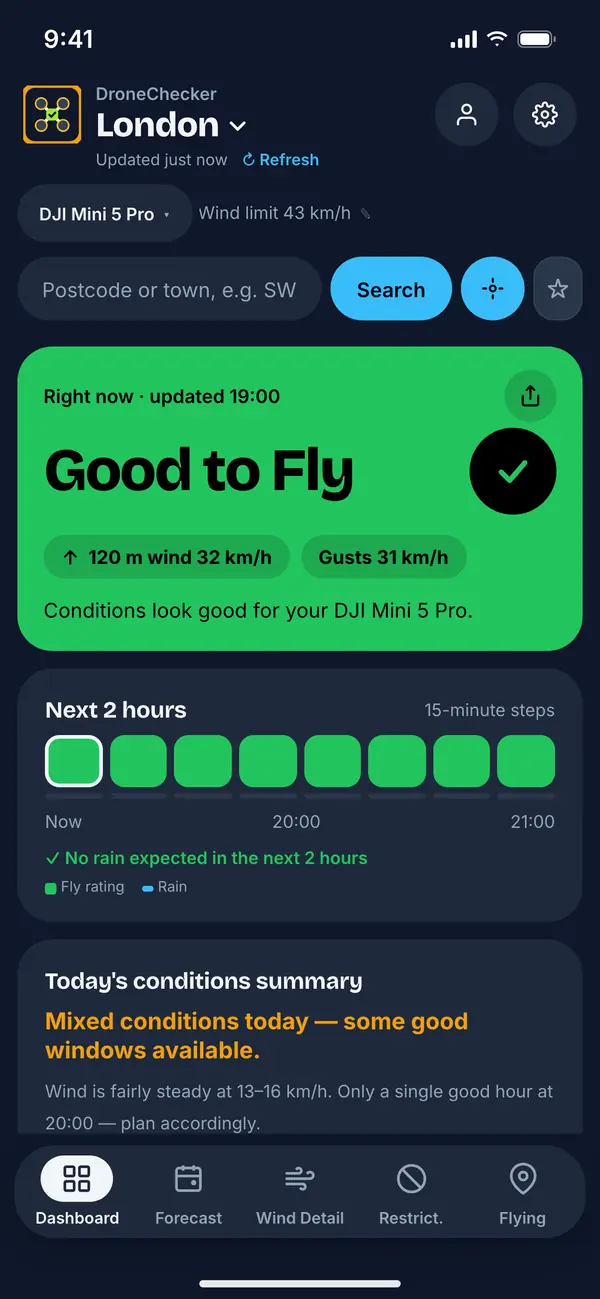
A new pilot is slower to correct a gust, and the flight home is often into the wind, which uses more battery than the flight out. DroneChecker's learner mode does this for you: it warns at 75% of your drone's wind and gust limits instead of the full figures.
Watch the gusts, not just the average
A gust is a short burst above the steady wind, and it is what pushes a small drone off its hover. The app checks gusts separately from the average wind.
It is usually windier higher up
A calm launch spot can sit under much stronger wind at 100 metres. The app's rating checks the wind at 80 m and 120 m too, and Plus shows the full breakdown. How wind changes with height
Stay dry
Most consumer drones are not waterproof, and even drizzle can get into the motors and camera. The app rates drizzle as Caution for that reason.
Check the KP index
Geomagnetic activity can upset the compass and GPS on a perfectly calm day. The app says Do Not Fly at KP 6 or above. The KP index explained
The numbers
Learner limits for popular first drones
These are the figures DroneChecker uses. The usual limit is the Do Not Fly line, based on the manufacturer's published wind resistance. The learner limit is the same line in learner mode, at 75% of it. Each applies to both steady wind and gusts.
| Drone | Learner | Usual |
|---|---|---|
| DJI Mini 5 Pro | 32 km/h20 mph | 43.2 km/h27 mph |
| DJI Flip | 29 km/h18 mph | 38.52 km/h24 mph |
| DJI Mini 3 & Mini 3 Pro | 29 km/h18 mph | 38.52 km/h24 mph |
| DJI Mini 4 Pro | 29 km/h18 mph | 38.52 km/h24 mph |
| DJI Neo 2 | 29 km/h18 mph | 38.52 km/h24 mph |
| Potensic Atom SE | 29 km/h18 mph | 38 km/h24 mph |
| DJI Neo | 22 km/h14 mph | 28.8 km/h18 mph |
| HoverAir X1 | 21 km/h13 mph | 28.44 km/h18 mph |
On the day
Your first flight
Pick a big open space for the first few flights: a field well away from people, roads, trees and power lines, where a mistake costs nothing. Look at the airspace map in the app before you set off, so you know what is near you.
Plan where you will stand
Somewhere you can keep the drone in sight the whole time.
Let it find GPS
Wait until the drone's app shows a strong GPS signal and confirms the home point, and calibrate the compass if it asks.
Start with a hover
Take off, climb to a couple of metres and let it hover for a minute. Check that it holds steady and that the sticks do what you expect, then land.
Practise the basics close by
Forward and back, side to side, slow turns, and landing where you meant to. Stay low and close until those feel easy.
Land with battery to spare
Leave plenty for the flight back, especially if it is into the wind.
The pre-flight checklist covers the checks to run before every flight.
Winter
Got it for Christmas? Flying in a UK winter
Most new drones are unwrapped in the shortest, coldest weeks of the year, which brings a few problems of its own.
Cold batteries
Drone batteries lose capacity in the cold, so a flight can be much shorter than the box suggests. Keep batteries indoors or in an inside pocket until you launch. Below 10°C the app estimates how much range you are losing. It rates below freezing as Caution, and below −10°C as Do Not Fly.
Short days
In late December the sun sets around 4pm, and earlier in Scotland, so aim to be flying by early afternoon. Sunset and golden hour times
Winter wind
The UK's windiest months are in winter, so calm days are fewer. The free Friday heads-up names the best flying window of the coming weekend. How alerts work
After dark
Flying at night has extra requirements in the Drone Code, so read it before you plan a dusk flight.
Your first month
Step up as you improve
Learner mode is free. The app offers it when you set up (“New to flying?”), or you can switch it on later in Settings. Fly window alerts and the Friday heads-up use the same learner limits.
-
Stage 1
75%of your drone's limits
Where learner mode starts. Warnings come early, while every flight is still new.
-
Stage 2
85%of your drone's limits
Offered after 10 logged flights or 30 days.
-
Full limits
100%of your drone's limits
Offered after 25 logged flights or 60 days at 85%. Accepting turns learner mode off.
It only moves up when you say so. While it is on, the in-app pre-flight checklist adds four beginner checks, and a new install gets a first-month checklist on the dashboard: picking your drone, saving your drone IDs, reading the Drone Code and looking at the airspace map.
Find your drone
Each of the 17 drones DroneChecker covers has its own page with its wind and gust limits and a live conditions check.
Browse drone guides →Find a calm day for your first flight
DroneChecker rates the wind, gusts, rain, cold and KP index against your drone's limits, with learner mode built in. Free, with no account needed.
DroneChecker's ratings are a guide, not a guarantee. Look at the conditions when you arrive, and if it does not feel right on the day, do not fly.